Welcome

menu

Official Google Webmaster Central Blog

Kamis, 19 Desember 2013

Official Google Webmaster Central Blog

Link to Google Webmaster Central Blog

Improving URL removals on third-party sites

Posted: 18 Dec 2013 06:15 PM PST

Webmaster level: all

Content on the Internet changes or disappears, and occasionally it's helpful to have search results for it updated quickly. Today we launched our improved public URL removal tool to make it easier to request updates based on changes on other people's websites. You can find it at https://www.google.com/webmasters/tools/removals


This tool is useful for removals on other peoples' websites. You could use this tool if a page has been removed completely, or if it was just changed and you need to have the snippet & cached page removed. If you're the webmaster of the site, then using the Webmaster Tools URL removal feature is faster & easier.

How to request a page be removed from search results

If the page itself was removed completely, you can request that it's removed from Google's search results. For this, it's important that the page returns the proper HTTP result code (403, 404, or 410), has a noindex robots meta tag, or is blocked by the robots.txt (blocking via robots.txt may not prevent indexing of the URL permanently). You can check the HTTP result code with a HTTP header checker. While we attempt to recognize "soft-404" errors, having the website use a clear response code is always preferred. Here's how to submit a page for removal:
  1. Enter the URL of the page. As before, this needs to be the exact URL as indexed in our search results. Here's how to find the URL.
  2. The analysis tool will confirm that the page is gone. Confirm the request to complete the submission.
  3. There's no step three!

How to request a page's cache & snippet be removed from search results

If the page wasn't removed, you can also use this tool to let us know that a text on a page (such as a name) has been removed or changed. It'll remove the snippet & cached page in Google's search results until our systems have been able to reprocess the page completely (it won't affect title or ranking). In addition to the page's URL, you'll need at least one word that used to be on the page but is now removed. You can learn more about cache removals in our Help Center.
  1. Enter the URL of the page which has changed. This needs to be the exact URL as indexed in our search results. Here's how to find the URL.
  2. Confirm that the page has been updated or removed, and confirm that the cache & snippet are outdated (do not match the current content).
  3. Now, enter a word that no longer appears on the live page, but which is still visible in the cache or snippet. See our previous blog post on removals for more details.

You can find out more about URL removals in our Help Center, as well as in our earlier blog posts on removing URLs & directories, removing & updating cached content, removing content you don't own, and tracking requests + what not to remove.

We hope these changes make it easier for you to submit removal requests! We welcome your feedback in our removals help forum category, where other users may also be able to help with more complicated removal issues.

Data Flashdisk tidak bisa dibuka? Atasi virus Shortcut VBS

Selasa, 17 Desember 2013

Data Flashdisk tidak bisa dibuka? Atasi virus Shortcut VBS

Link to ebsoft.web.id

Data Flashdisk tidak bisa dibuka? Atasi virus Shortcut VBS

Posted: 16 Dec 2013 08:42 AM PST

Beberapa hari (minggu) terakhir ini, saya banyak menerima ‘pasien’ yang terkena virus (worm tepatnya). Laptop dan flashdisk saudara, tetangga dan teman ternyata banyak yang terkena virus, yang setelah dicek, ternyata semuanya virusnya sejenis. Semua data di flashdisk juga tidak bisa dibuka atau tiba-tiba ‘hilang’ dari tampilan. Ketika USB flashdisk dimasukkan ke komputer yang terkena virus […]

[ Ini merupakan ringkasan artikel , selengkapnya silahkan klik judul link diatas ]

Belajar Ngeblog di BLOG kurnia septa

Minggu, 15 Desember 2013

Belajar Ngeblog di BLOG kurnia septa

Link to Belajar Ngeblog di BLOG

Trik dan Tips SEO Ampuh Untuk Blog Tumblr

Posted: 14 Dec 2013 07:29 PM PST

Tumblr memang tidah terlalu ramah dengan Search Engine Optimization (SEO), meskipun demikian kita bisa tetap mengoptimalkan SEO blog tumblr. Sebagai platform blogging yang saat ini populer, kita bisa mengedit theme atau HTML blog Tumblr. Inilah yang kita manfaatkan untuk untuk SEO tumblr, yaitu dengan menambah kode di theme blog Tumblr. Langsung saja, kita bahas trik dan tips ampuh untuk

Official Google Webmaster Central Blog

Jumat, 13 Desember 2013

Official Google Webmaster Central Blog

Link to Google Webmaster Central Blog

Structured Data dashboard: new markup error reports for easier debugging

Posted: 12 Dec 2013 06:02 AM PST

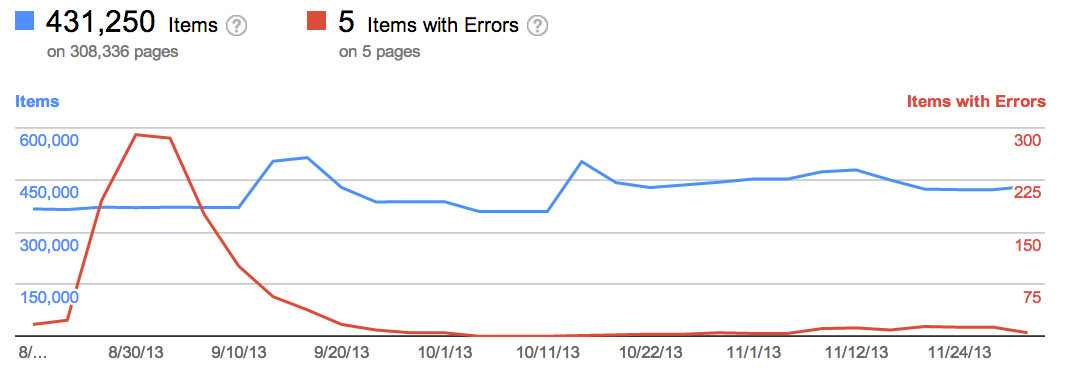
Since we launched the Structured Data dashboard last year, it has quickly become one of the most popular features in Webmaster Tools. We've been working to expand it and make it even easier to debug issues so that you can see how Google understands the marked-up content on your site.

Starting today, you can see items with errors in the Structured Data dashboard. This new feature is a result of a collaboration with webmasters, whom we invited in June to>register as early testers of markup error reporting in Webmaster Tools. We've incorporated their feedback to improve the functionality of the Structured Data dashboard.

An "item" here represents one top-level structured data element (nested items are not counted) tagged in the HTML code. They are grouped by data type and ordered by number of errors:

We've added a separate scale for the errors on the right side of the graph in the dashboard, so you can compare items and errors over time. This can be useful to spot connections between changes you may have made on your site and markup errors that are appearing (or disappearing!).

Our data pipelines have also been updated for more comprehensive reporting, so you may initially see fewer data points in the chronological graph.

How to debug markup implementation errors

  1. To investigate an issue with a specific content type, click on it and we'll show you the markup errors we've found for that type. You can see all of them at once, or filter by error type using the tabs at the top:
  2. Check to see if the markup meets the implementation guidelines for each content type. In our example case (events markup), some of the items are missing a startDate or name property. We also surface missing properties for nested content types (e.g. a review item inside a product item) — in this case, this is the lowprice property.
  3. Click on URLs in the table to see details about what markup we've detected when we crawled the page last and what's missing. You'll can also use the "Test live data" button to test your markup in the Structured Data Testing Tool. Often when checking a bunch of URLs, you're likely to spot a common issue that you can solve with a single change (e.g. by adjusting a setting or template in your content management system).
  4. Fix the issues and test the new implementation in the Structured Data Testing Tool. After the pages are recrawled and reprocessed, the changes will be reflected in the Structured Data dashboard.

We hope this new feature helps you manage the structured data markup on your site better. We will continue to add more error types in the coming months. Meanwhile, we look forward to your comments and questions here or in the dedicated Structured Data section of the Webmaster Help forum.

Official Google Webmaster Central Blog

Rabu, 11 Desember 2013

Official Google Webmaster Central Blog

Link to Google Webmaster Central Blog

Checklist and videos for mobile website improvement

Posted: 10 Dec 2013 11:31 AM PST

Webmaster Level: Intermediate to Advanced

Unsure where to begin improving your smartphone website? Wondering how to prioritize all the advice? We just published a checklist to help provide an efficient approach to mobile website improvement. Several topics in the checklist link to a relevant business case or study, other topics include a video explaining how to make data from Google Analytics and Webmaster Tools actionable during the improvement process. Copied below are shortened sections of the full checklist. Please let us know if there's more you'd like to see, or if you have additional topics for us to include.

Step 1: Stop frustrating your customers
  • Remove cumbersome extra windows from all mobile user-agents | Google recommendation, Article
    • JavaScript pop-ups that can be difficult to close.
    • Overlays, especially to download apps (instead consider a banner such as iOS 6+ Smart App Banners or equivalent, side navigation, email marketing, etc.).
    • Survey requests prior to task completion.

  • Provide device-appropriate functionality
    • Remove features that require plugins or videos not available on a user's device (e.g., Adobe Flash isn't playable on an iPhone or on Android versions 4.1 and higher). | Business case
    • Serve tablet users the desktop version (or if available, the tablet version). | Study
    • Check that full desktop experience is accessible on mobile phones, and if selected, remains in full desktop version for duration of the session (i.e., user isn't required to select "desktop version" after every page load). | Study

  • Correct high traffic, poor user-experience mobile pages


    How to correct high-traffic, poor user-experience mobile pages with data from Google Analytics bounce rate and events (slides)

  • Make quick fixes in performance (and continue if behind competition) | Business case


  • How to make quick fixes in mobile site performance and compare your site to the competition (slides)

    To see all topics in "Stop frustrating your customers," please see the full Checklist for mobile website improvement.

Step 2: Facilitate task completion
  • Optimize crawling, indexing, and the searcher experience | Business case
    • Unblock resources (CSS, JavaScript) that are robots.txt disallowed.
    • Implement search-engine best practices given your mobile implementation:

  • Optimize popular mobile persona workflows for your site


    How to optimize popular mobile workflows using Google Webmaster Tools and Google Analytics (slides)
Step Three: Convert customers into fans!
  • Consider search integration points with mobile apps | Announcement, Information

  • Brainstorm new ways to provide value
    • Build for mobile behavior, such as the in-store shopper. | Business case
    • Leverage smartphone GPS, camera, accelerometer.
    • Increase sharing or social behavior. | Business case
    • Consider intuitive/fun tactile functionality with swiping, shaking, tapping.

Written by , Developer Programs Tech Lead

Belajar Ngeblog di BLOG kurnia septa

Sabtu, 07 Desember 2013

Belajar Ngeblog di BLOG kurnia septa

Link to Belajar Ngeblog di BLOG

Cara Membuat Widget Like Box Facebook Melayang

Posted: 07 Dec 2013 05:17 AM PST

Ingin mendapatkan jumlah like (suka) halaman facebook blogmu lebih banyak? Ada banyak cara, salah satunya memasang widget like box yang disediakan oleh facebook plugins dengan model melayang (float). Jangan khawatir widget ini akan menganggu pembaca setia blogmu, karena meskipun melayang ada tombol close untuk menghilangkan widget like box itu. Widget like box facebook jika dipasang di blog,

Official Google Webmaster Central Blog

Kamis, 05 Desember 2013

Official Google Webmaster Central Blog

Link to Google Webmaster Central Blog

Smartphone crawl errors in Webmaster Tools

Posted: 04 Dec 2013 02:50 AM PST

Webmaster level: all

Some smartphone-optimized websites are misconfigured in that they don't show searchers the information they were seeking. For example, smartphone users are shown an error page or get redirected to an irrelevant page, but desktop users are shown the content they wanted. Some of these problems, detected by Googlebot as crawl errors, significantly hurt your website's user experience and are the basis of some of our recently-announced ranking changes for smartphone search results.

Starting today, you can use the expanded Crawl Errors feature in Webmaster Tools to help identify pages on your sites that show these types of problems. We're introducing a new Smartphone errors tab where we share pages we've identified with errors only found with Googlebot for smartphones.

Some of the errors we share include:

  • Server errors: A server error is when Googlebot got an HTTP error status code when it crawled the page.

  • Not found errors and soft 404s: A page can show a "not found" message to Googlebot, either by returning an HTTP 404 status code or when the page is detected as a soft error page.

  • Faulty redirects: A faulty redirect is a smartphone-specific error that occurs when a desktop page redirects smartphone users to a page that is not relevant to their query. A typical example is when all pages on the desktop site redirect smartphone users to the homepage of the smartphone-optimized site.

  • Blocked URLs: A blocked URL is when the site's robots.txt explicitly disallows crawling by Googlebot for smartphones. Typically, such smartphone-specific robots.txt disallow directives are erroneous. You should investigate your server configuration if you see blocked URLs reported in Webmaster Tools.

Fixing any issues shown in Webmaster Tools can make your site better for users and help our algorithms better index your content. You can learn more about how to build smartphone websites and how to fix common errors. As always, please ask in our forums if you have any questions.